npm install -g @hiero-ledger/solo@latest instead.
See System Readiness for full install instructions.System Readiness
Categories:
Overview
Before you deploy a local Hiero test network with solo one-shot single deploy, your machine must meet specific hardware, operating system, and tooling requirements.
This page covers the minimum and recommended memory, CPU, and storage; supported platforms (macOS, Linux, and Windows — natively with PowerShell, or via WSL2); and the required versions of Docker/Podman, Node.js, and Kubernetes tooling.
By the end of this page, your container runtime will be installed and your platform environment configured. Then proceed to Quickstart to install Solo and deploy.
Hardware Requirements
Solo’s resource requirements depend on your deployment size:
| Configuration | Minimum RAM | Recommended RAM | Minimum CPU | Minimum Storage |
|---|---|---|---|---|
| Single-node | 12 GB | 16 GB | 4 cores | 20 GB free |
| Multi-node (3+ nodes) | 16 GB | 24 GB | 8 cores | 20 GB free |
Note: If you are using Docker Desktop, ensure the resource limits under Settings → Resources are set to at least these values - Docker caps usage independently of your machine’s total available memory.
Software Requirements
Solo sets up most of the tools it needs for you. The table below shows what each install method provides, what Solo provisions automatically, and what you must install yourself.
| Tool | Required version | How it is installed |
|---|---|---|
| Solo | latest | npm install -g @hiero-ledger/solo@latest (recommended); brew install hiero-ledger/tools/solo (deprecated - Homebrew support ends August 31, 2026) |
| Node.js | >= 22.0.0 (lts/jod) | You install it (required for npm); Homebrew installs it automatically (deprecated) |
| Container runtime (Docker / Podman) | See Docker below | You install it — Docker Desktop (macOS/Windows) or Docker Engine (Linux). Solo auto-installs Podman on Linux/macOS/WSL2 if Docker Engine is not found. Not supported on native Windows. |
| kubectl | >= v1.32.2 | Solo provisions it at deploy time - reuses a compatible copy already on your system, or downloads one into ~/.solo/bin |
| Helm | v3.14.2 | Solo provisions it at deploy time |
| Kind | >= v0.29.0 | Solo provisions it at deploy time |
| Kubernetes | >= v1.32.2 | Installed automatically by Kind |
| k9s (optional) | >= v0.27.4 | You install it |
Note: Solo’s provisioned copies of kubectl, Kind, and Helm live in
~/.solo/bin, which is not necessarily on yourPATH. If you want to runkubectl,kind, orhelmcommands yourself (some guides do), install kubectl, Kind, and Helm on yourPATHseparately.
Windows (WSL2) prerequisite
Kind (which Solo provisions automatically) requires WSL2 to be enabled on Windows, but you do not need a WSL2 Linux distro installed — only the WSL2 feature itself. Enable it with:
wsl --install --no-distribution
WSL2 requires hardware virtualization and the Virtual Machine Platform Windows
feature. If virtualization is unavailable (for example, wsl --install reports
HCS_E_HYPERV_NOT_INSTALLED), use the native Windows (PowerShell) path
instead, which does not require WSL2.
Docker
Solo requires Docker Desktop (macOS, Windows) or Docker Engine / Podman (Linux) with sufficient resources:
- Memory: at least 12 GB available for containers.
- CPU: at least 6 cores available for containers.
Configure Resources by Platform
macOS and Windows (Docker Desktop)
To allocate the required resources in Docker Desktop:
Open Docker Desktop.
Go to Settings > Resources > Memory and set it to at least 12 GB.
Go to Settings > Resources > CPU and set it to at least 6 cores.
Click Apply & Restart.
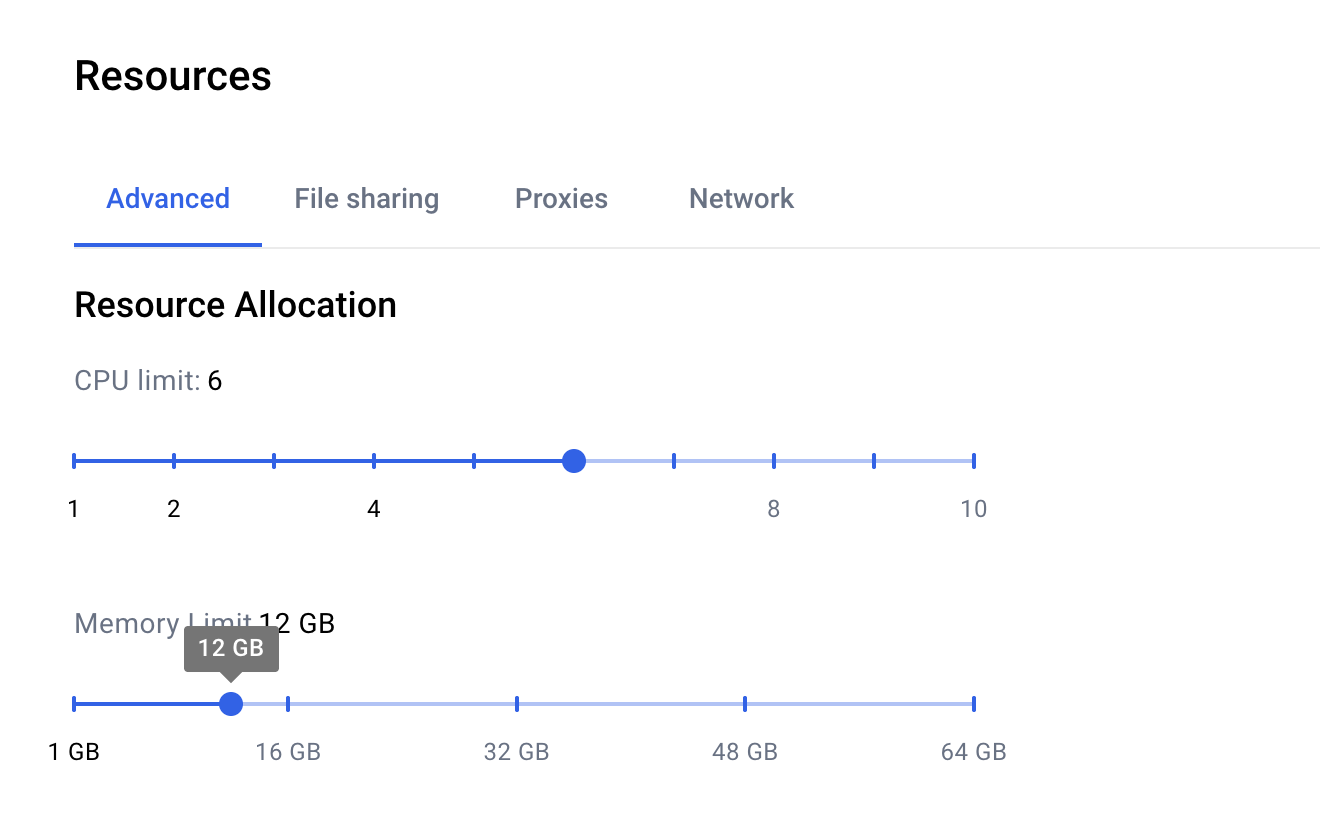
Note: If Docker Desktop does not have enough memory or CPU allocated, the one-shot deployment will fail or produce unhealthy pods.
Linux
Docker Engine on Linux uses system memory directly and does not have a resource allocation interface like Docker Desktop.
Resource Check:
- Ensure your machine has at least 12 GB of free RAM available before running
solo one-shot single deploy. - Check available memory with:
free -h - If you have insufficient RAM, the deployment may fail or pods may become unhealthy.
Podman on Linux: If using Podman instead of Docker Engine, ensure your system has at least 12 GB of free RAM available.
Platform Setup
Solo supports macOS, Linux, and Windows (natively with PowerShell, or via WSL2). Select your platform below to install the required container runtime and configure your environment, before proceeding to Quickstart:
⚠️ Homebrew support is being deprecated. Solo will stop publishing updates to Homebrew after August 31, 2026. New users should install via npm. Existing Homebrew users should migrate before August 31.
Install Node.js (>= 22.0.0):
Download from nodejs.org, or install via nvm:
curl -o- https://raw.githubusercontent.com/nvm-sh/nvm/v0.40.3/install.sh | bash
source ~/.nvm/nvm.sh
nvm install --lts
Install Docker Desktop:
- Download from: https://www.docker.com/products/docker-desktop
- Start Docker Desktop and configure resources:
- Settings → Resources → Memory: set to at least 12 GB
- Settings → Resources → CPU: set to at least 6 cores
- Click Apply & Restart
macOS prerequisite: Docker Desktop must be open before running
solo one-shot single deploy. The Docker daemon is not started automatically on macOS, so confirm Docker Desktop is running from your menu bar before you begin.Install Solo:
npm install -g @hiero-ledger/solo@latestVerify the installation:
solo --version
Install Node.js (>= 22.0.0):
Using nvm (recommended):
curl -o- https://raw.githubusercontent.com/nvm-sh/nvm/v0.40.3/install.sh | bash
source ~/.nvm/nvm.sh
nvm install --lts
Or download from nodejs.org.
Install Docker Engine (Ubuntu/Debian):
sudo apt-get update
sudo apt-get install -y docker.io
sudo systemctl enable docker
sudo systemctl start docker
sudo usermod -aG docker ${USER}
Log out and back in for the group changes to take effect.
Fedora/RHEL: Replace the
apt-getcommands above with your distro’s package manager. For example, on Fedora:sudo dnf install -y docker-ce docker-ce-cli containerd.io(after adding Docker’s dnf repo — see Docker’s Fedora guide). Then runsudo systemctl enable --now dockerandsudo usermod -aG docker ${USER}.Install Solo:
npm install -g @hiero-ledger/solo@latestVerify the installation:
solo --version
Run Solo natively from Windows PowerShell. Run every command below in a PowerShell terminal.
Install Docker Desktop for Windows:
- Download from: https://www.docker.com/products/docker-desktop.
- Start Docker Desktop and configure resources:
- Settings → Resources → Memory: set to at least 12 GB
- Settings → Resources → CPU: set to at least 6 cores
- Click Apply & Restart
Windows prerequisite: Docker Desktop must be running before you run
solo one-shot single deploy.Install Node.js (>= 22.0.0):
winget install OpenJS.NodeJS.LTSOr download the installer from nodejs.org.
Note: Open a new PowerShell window after installing tools so updated PATH entries take effect.
Your environment is ready. Proceed to Quickstart to install Solo and deploy.
Note: Make sure your machine meets the Windows (WSL2) prerequisite first. If WSL and a Linux distribution are already installed, skip step 1 (and you may use a distribution other than Ubuntu).
Run the following command in Windows PowerShell (as Administrator), then reboot and open the Ubuntu terminal. All subsequent commands must be run inside the Ubuntu (WSL2) terminal.
wsl --install UbuntuInstall Node.js (>= 22.0.0) inside the Ubuntu terminal:
Using nvm:
curl -o- https://raw.githubusercontent.com/nvm-sh/nvm/v0.40.3/install.sh | bash
source ~/.nvm/nvm.sh
nvm install --lts
Install Docker Desktop for Windows:
- Download from: https://www.docker.com/products/docker-desktop
- Enable WSL2 integration: Settings → Resources → WSL Integration
- Configure resources:
- Settings → Resources → Memory: set to at least 12 GB
- Settings → Resources → CPU: set to at least 6 cores
- Click Apply & Restart
Install Solo:
npm install -g @hiero-ledger/solo@latestVerify the installation:
solo --version
Optional Tools
The following tools are not required but are recommended for monitoring and managing your local network:
k9s (
>= v0.27.4): A terminal-based UI for managing Kubernetes clusters. Install it with:brew install k9sRun
k9sto launch the cluster viewer.
Version Compatibility Reference
| Solo Version | Node.js | Consensus Node | Kubernetes | Docker Resources | Release Date | End of Support |
|---|---|---|---|---|---|---|
| 0.91.0 | >= 22.0.0 (lts/jod) | v0.76.4 | >= v1.32.2 | Memory >= 12GB, CPU cores >= 6 | 2026-09-24 | 2026-10-24 |
| 0.90.0 (LTS) | >= 22.0.0 (lts/jod) | v0.76.4 | >= v1.32.2 | Memory >= 12GB, CPU cores >= 6 | 2026-09-22 | 2026-12-22 |
| 0.89.0 | >= 22.0.0 (lts/jod) | v0.75.1 | >= v1.32.2 | Memory >= 12GB, CPU cores >= 6 | 2026-09-15 | 2026-10-15 |
| 0.88.0 | >= 22.0.0 (lts/jod) | v0.75.1 | >= v1.32.2 | Memory >= 12GB, CPU cores >= 6 | 2026-08-25 | 2026-09-25 |
| 0.84.0 (LTS) | >= 22.0.0 (lts/jod) | v0.74.0 | >= v1.32.2 | Memory >= 12GB, CPU cores >= 6 | 2026-07-28 | 2026-10-28 |
| 0.82.0 (LTS) | >= 22.0.0 (lts/jod) | v0.74.0 | >= v1.32.2 | Memory >= 12GB, CPU cores >= 6 | 2026-07-14 | 2026-10-14 |
| 0.80.0 (LTS) | >= 22.0.0 (lts/jod) | v0.74.0 | >= v1.32.2 | Memory >= 12GB, CPU cores >= 6 | 2026-06-30 | 2026-09-30 |
To see a list of legacy releases, please check the legacy versions documentation page.
Troubleshooting Installation
If you experience issues installing or upgrading Solo - for example, conflicts with a previous installation - clean up your environment and reinstall:
To remove a legacy npm install or perform a full environment reset (delete Solo-managed Kind clusters and your
~/.solodirectory), see the Cleanup guide.To upgrade an existing install, install a specific version, or switch between Homebrew and npm, see Upgrading an existing Solo installation.
macOS “mounts denied” error on Apple Silicon: If
solo one-shot single deployfails immediately with a “mounts denied” or “path is not shared from the host” error, add/opt/homebrewto Docker Desktop’s File Sharing list: Settings → Resources → File Sharing → + → add/opt/homebrew→ Apply & Restart. This can occur on Apple Silicon Macs (M1/M2/M3/M4) when Homebrew’s install path (/opt/homebrew) is not included in Docker Desktop’s shared directories. Intel Mac users (Homebrew path/usr/local) are not affected.WSL2 fails to install (for example,
wsl --installreportsHCS_E_HYPERV_NOT_INSTALLED): WSL2 requires hardware virtualization and the Virtual Machine Platform feature. See Microsoft’s Install WSL guide, or use the native Windows (PowerShell) path, which does not require WSL2.First deploy fails with a PostgreSQL startup timeout: If
solo one-shot single deployfails during mirror node setup with a PostgreSQL startup timeout, this is a known intermittent issue on first deploy. Destroy the deployment and retry:solo one-shot single destroy solo one-shot single deploy