Attach JVM Debugger and Retrieve Logs
Categories:
Overview
This guide covers three debugging workflows:
- Retrieve logs from a running consensus node using k9s or the Solo CLI
- Attach a JVM debugger in IntelliJ IDEA to a running or restarting node
- Save and restore network state files to replay scenarios across sessions
Prerequisites
Before proceeding, ensure you have completed the following:
- System Readiness — your local environment meets all hardware and software requirements.
- Quickstart — you have a running Solo cluster and are familiar with the basic Solo workflow.
You will also need:
- k9s installed (
brew install k9s) - IntelliJ IDEA with a Remote JVM Debug run configuration (for JVM debugging only)
- A local checkout of
hiero-consensus-node
that has been built with
assembleorbuild(for JVM debugging only)
1. Retrieve Consensus Node Logs
Using k9s
Run k9s -A in your terminal to open the cluster dashboard, then select one
of the network node pods.
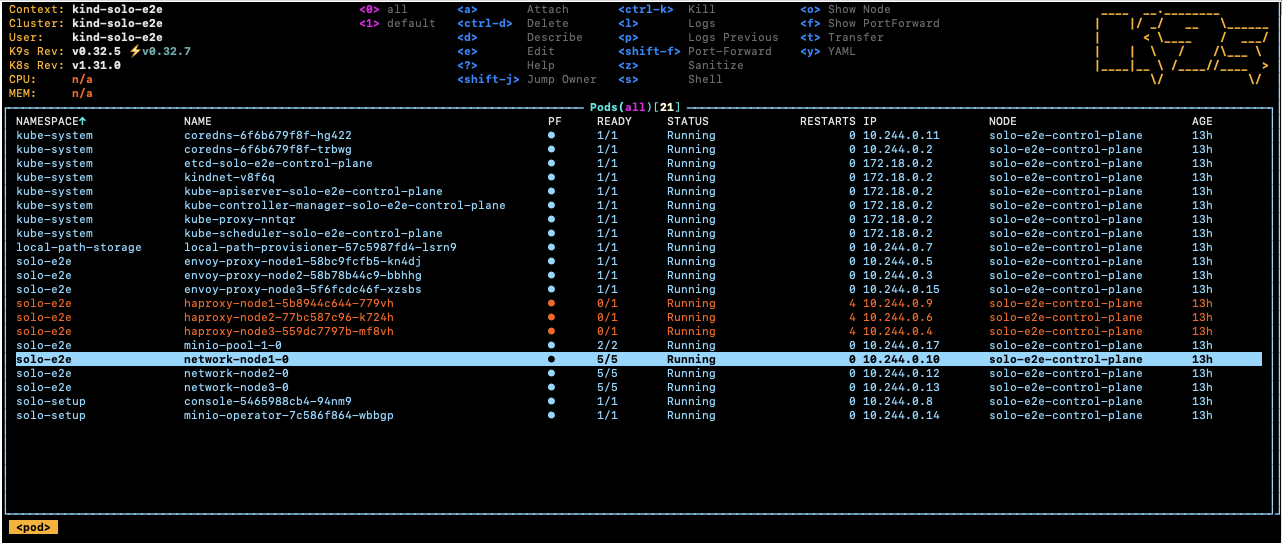
Select the root-container and press s to open a shell inside the container.
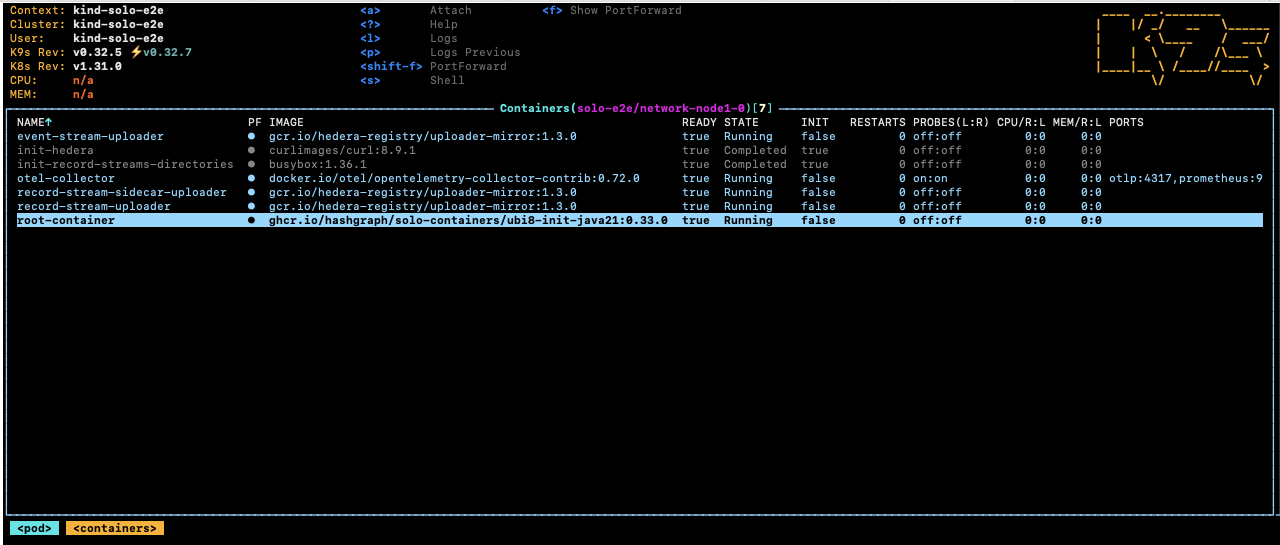
Navigate to the Hedera application directory to browse logs and configuration:
cd /opt/hgcapp/services-hedera/HapiApp2.0/
From there you can inspect logs and configuration files:
[root@network-node1-0 HapiApp2.0]# ls -ltr data/config/
total 0
lrwxrwxrwx 1 root root 27 Dec  4 02:05 bootstrap.properties -> ..data/bootstrap.properties
lrwxrwxrwx 1 root root 29 Dec  4 02:05 application.properties -> ..data/application.properties
lrwxrwxrwx 1 root root 32 Dec  4 02:05 api-permission.properties -> ..data/api-permission.properties

[root@network-node1-0 HapiApp2.0]# ls -ltr output/
total 1148
-rw-r--r-- 1 hedera hedera       0 Dec  4 02:06 hgcaa.log
-rw-r--r-- 1 hedera hedera       0 Dec  4 02:06 queries.log
drwxr-xr-x 2 hedera hedera    4096 Dec  4 02:06 transaction-state
drwxr-xr-x 2 hedera hedera    4096 Dec  4 02:06 state
-rw-r--r-- 1 hedera hedera     190 Dec  4 02:06 swirlds-vmap.log
drwxr-xr-x 2 hedera hedera    4096 Dec  4 16:01 swirlds-hashstream
-rw-r--r-- 1 hedera hedera 1151446 Dec  4 16:07 swirlds.log
Using the Solo CLI (Alternative option)
To download hgcaa.log and swirlds.log as a zip archive without entering
the container shell, run:
# Downloads logs to ~/.solo/logs/<namespace>/<timestamp>/
solo consensus diagnostics all --deployment solo-deployment
2. Attach a JVM Debugger in IntelliJ IDEA
Solo supports pausing node startup at a JDWP debug port so you can attach IntelliJ IDEA before the node begins processing transactions.
Configure IntelliJ IDEA
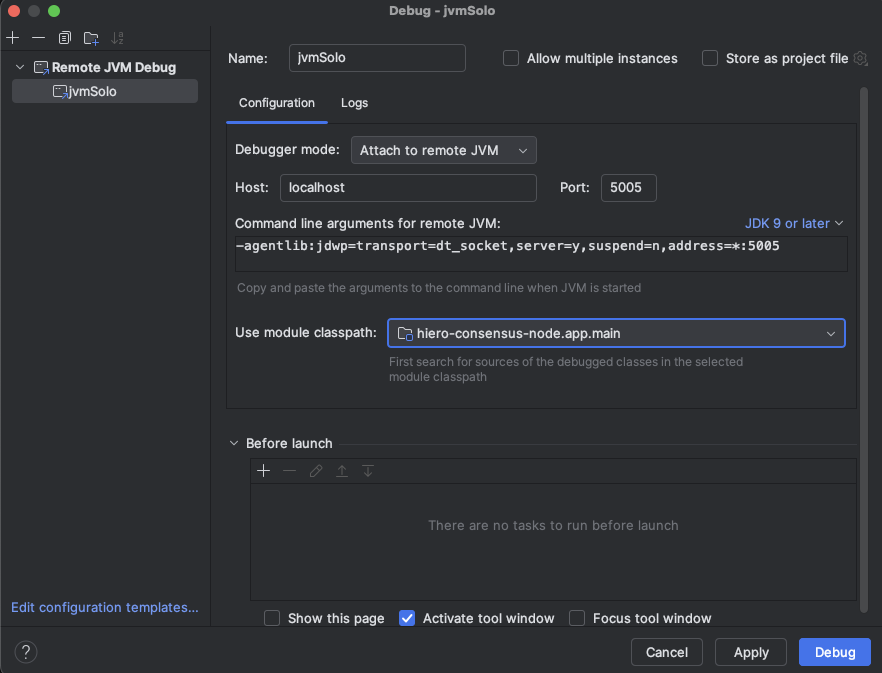
Create a Remote JVM Debug run configuration in IntelliJ IDEA.
For the Hedera Node application:
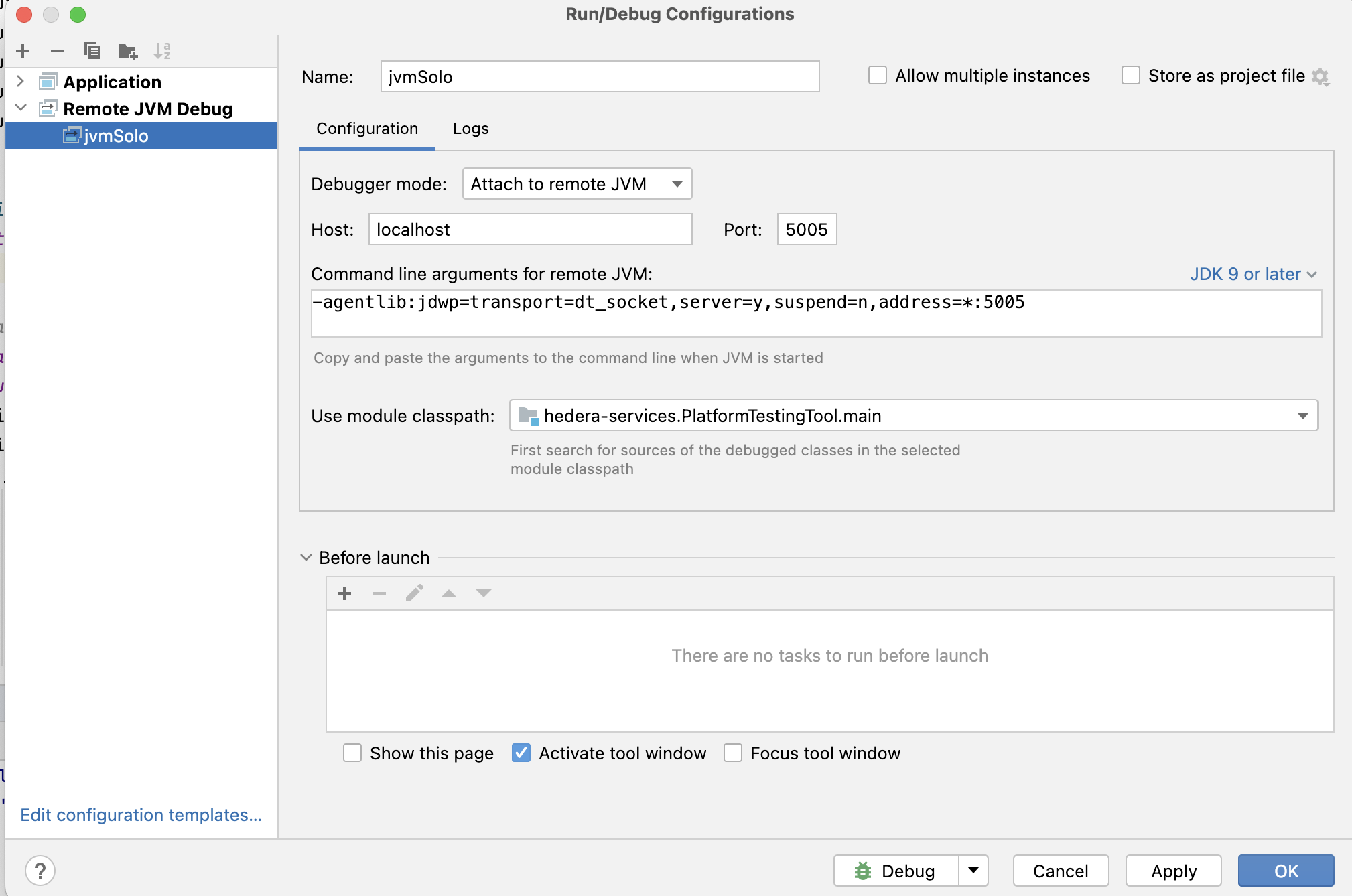
If you are working on the Platform test application instead:
Set any breakpoints you need before launching the Solo command in the next step.
Note: The
local-build-pathin the commands below references../hiero-consensus-node/hedera-node/data. Adjust this path to match your local checkout location. Ensure the directory is up to date by running./gradlew assemblein thehiero-consensus-noderepo before proceeding.
Example 1 — Debug a node during initial network deployment
This example deploys a three-node network and pauses node2 for debugger
attachment.
SOLO_CLUSTER_NAME=solo-cluster
SOLO_NAMESPACE=solo-e2e
SOLO_CLUSTER_SETUP_NAMESPACE=solo-setup
SOLO_DEPLOYMENT=solo-deployment

# Remove any previous state to avoid name collision issues
rm -Rf ~/.solo
kind delete cluster -n "${SOLO_CLUSTER_NAME}"
kind create cluster -n "${SOLO_CLUSTER_NAME}"

solo init
solo cluster-ref config setup -s "${SOLO_CLUSTER_SETUP_NAMESPACE}"
solo cluster-ref config connect --cluster-ref ${SOLO_CLUSTER_NAME} --context kind-${SOLO_CLUSTER_NAME}

solo deployment config create --namespace "${SOLO_NAMESPACE}" --deployment "${SOLO_DEPLOYMENT}"
solo deployment cluster attach --deployment "${SOLO_DEPLOYMENT}" --cluster-ref ${SOLO_CLUSTER_NAME} --num-consensus-nodes 3
solo keys consensus generate --deployment "${SOLO_DEPLOYMENT}" --gossip-keys --tls-keys -i node1,node2,node3

solo consensus network deploy --deployment "${SOLO_DEPLOYMENT}" -i node1,node2,node3 --debug-node-alias node2
solo consensus node setup --deployment "${SOLO_DEPLOYMENT}" -i node1,node2,node3 --local-build-path ../hiero-consensus-node/hedera-node/data
solo consensus node start --deployment "${SOLO_DEPLOYMENT}" -i node1,node2,node3 --debug-node-alias node2
When Solo reaches the active-check phase for node2, it pauses and displays:
❯ Check all nodes are ACTIVE
  Check node: node1,
  Check node: node2,  Please attach JVM debugger now.
  Check node: node3,
? JVM debugger setup for node2. Continue when debugging is complete? (y/N)
At this point, launch the remote debug configuration in IntelliJ IDEA. The node will stop at your breakpoint:
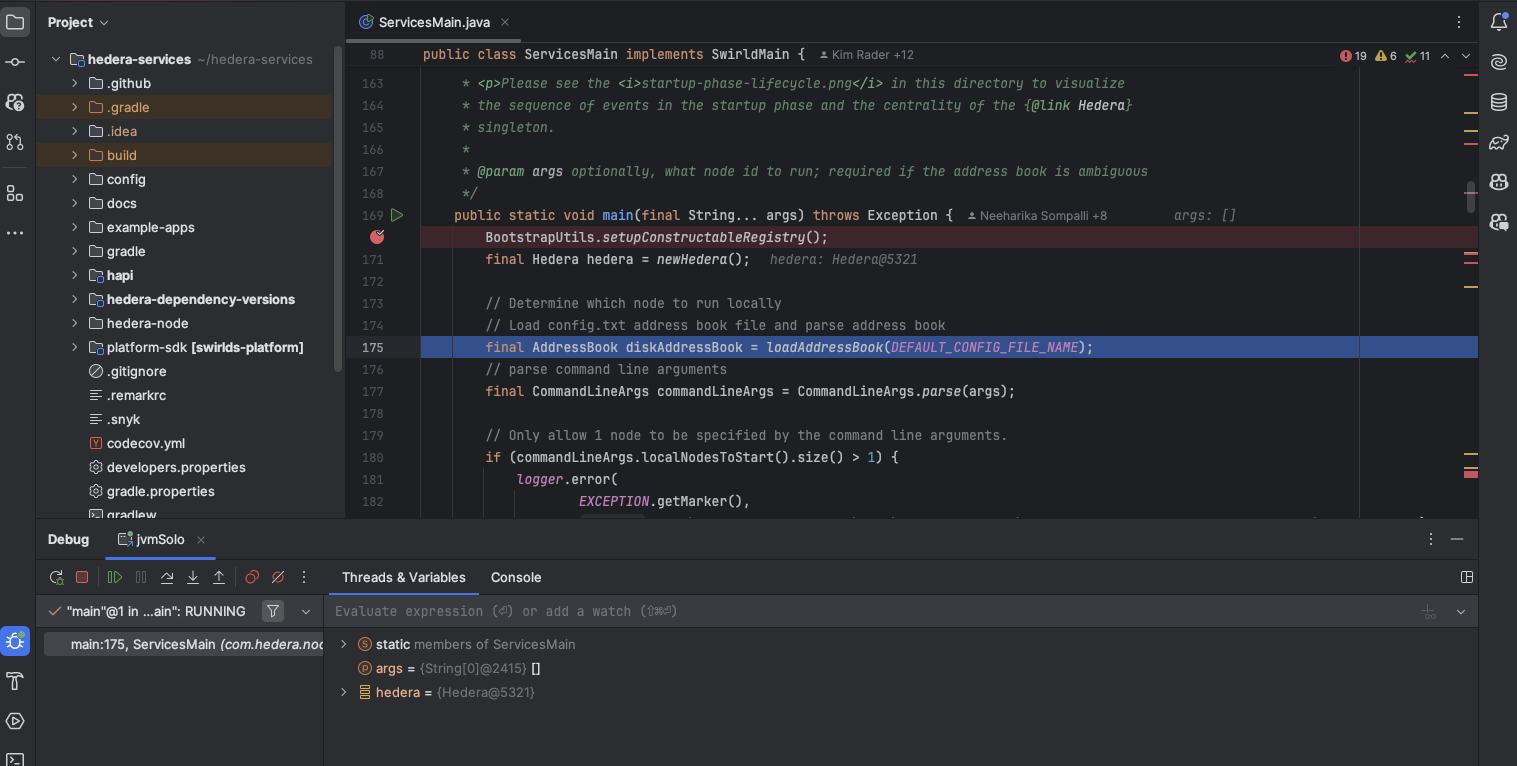
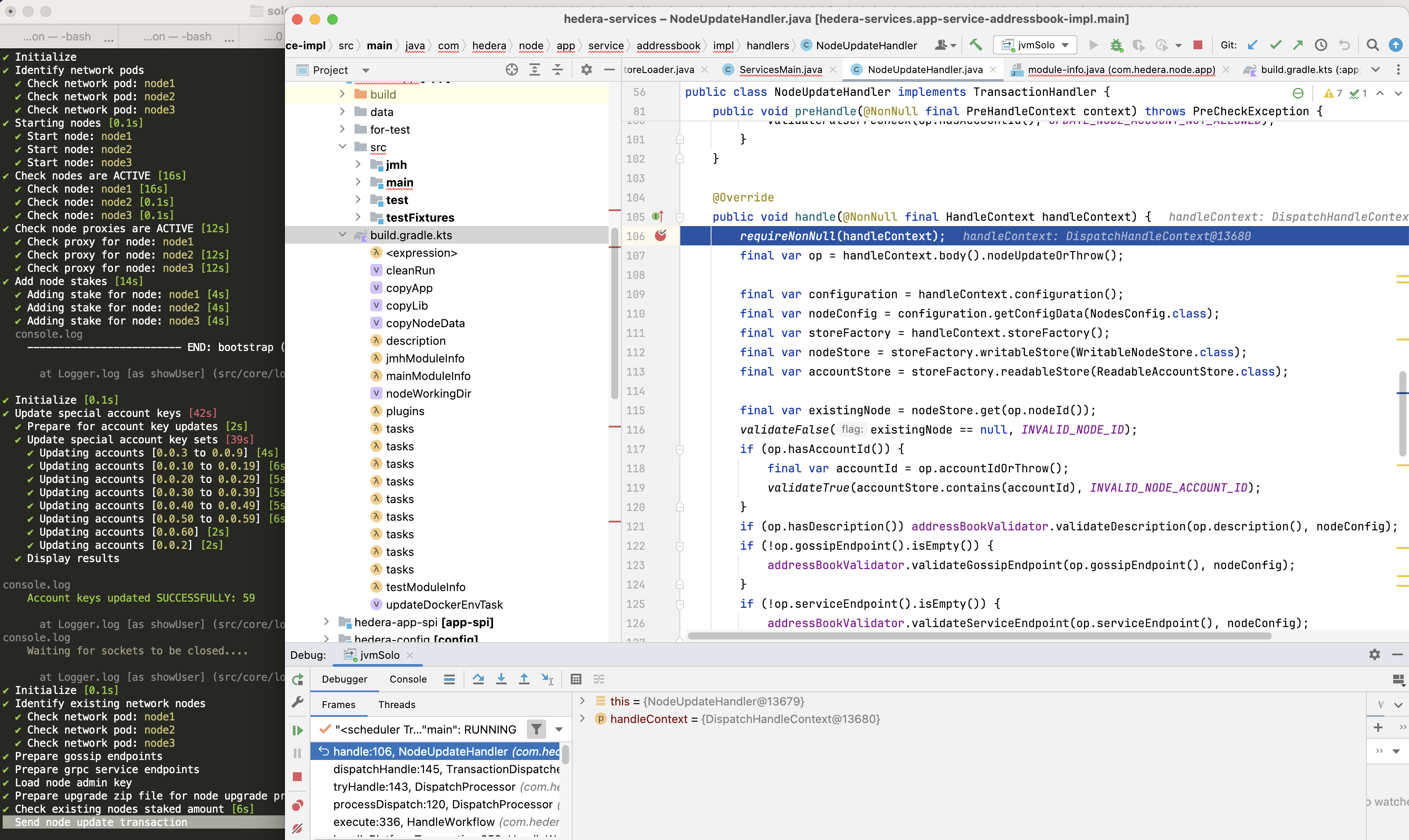
When you are done debugging, resume execution in IntelliJ, then type y in
the terminal to allow Solo to continue.
Example 2 — Debug a node during a node add operation
This example starts a three-node network and then attaches a debugger while
adding node4.
SOLO_CLUSTER_NAME=solo-cluster
SOLO_NAMESPACE=solo-e2e
SOLO_CLUSTER_SETUP_NAMESPACE=solo-setup
SOLO_DEPLOYMENT=solo-deployment

rm -Rf ~/.solo
kind delete cluster -n "${SOLO_CLUSTER_NAME}"
kind create cluster -n "${SOLO_CLUSTER_NAME}"

solo init
solo cluster-ref config setup -s "${SOLO_CLUSTER_SETUP_NAMESPACE}"
solo cluster-ref config connect --cluster-ref ${SOLO_CLUSTER_NAME} --context kind-${SOLO_CLUSTER_NAME}

solo deployment config create --namespace "${SOLO_NAMESPACE}" --deployment "${SOLO_DEPLOYMENT}"
solo deployment cluster attach --deployment "${SOLO_DEPLOYMENT}" --cluster-ref ${SOLO_CLUSTER_NAME} --num-consensus-nodes 3
solo keys consensus generate --deployment "${SOLO_DEPLOYMENT}" --gossip-keys --tls-keys -i node1,node2,node3

solo consensus network deploy --deployment "${SOLO_DEPLOYMENT}" -i node1,node2,node3 --pvcs true
solo consensus node setup --deployment "${SOLO_DEPLOYMENT}" -i node1,node2,node3 --local-build-path ../hiero-consensus-node/hedera-node/data
solo consensus node start --deployment "${SOLO_DEPLOYMENT}" -i node1,node2,node3

solo consensus node add --deployment "${SOLO_DEPLOYMENT}" --gossip-keys --tls-keys \
  --debug-node-alias node4 \
  --local-build-path ../hiero-consensus-node/hedera-node/data \
  --pvcs true
Example 3 — Debug a node during a node update operation
This example attaches a debugger to node2 while it restarts as part of an
update operation.
SOLO_CLUSTER_NAME=solo-cluster
SOLO_NAMESPACE=solo-e2e
SOLO_CLUSTER_SETUP_NAMESPACE=solo-setup
SOLO_DEPLOYMENT=solo-deployment

rm -Rf ~/.solo
kind delete cluster -n "${SOLO_CLUSTER_NAME}"
kind create cluster -n "${SOLO_CLUSTER_NAME}"

solo init
solo cluster-ref config setup -s "${SOLO_CLUSTER_SETUP_NAMESPACE}"
solo cluster-ref config connect --cluster-ref ${SOLO_CLUSTER_NAME} --context kind-${SOLO_CLUSTER_NAME}

solo deployment config create --namespace "${SOLO_NAMESPACE}" --deployment "${SOLO_DEPLOYMENT}"
solo deployment cluster attach --deployment "${SOLO_DEPLOYMENT}" --cluster-ref ${SOLO_CLUSTER_NAME} --num-consensus-nodes 3
solo keys consensus generate --deployment "${SOLO_DEPLOYMENT}" --gossip-keys --tls-keys -i node1,node2,node3

solo consensus network deploy --deployment "${SOLO_DEPLOYMENT}" -i node1,node2,node3
solo consensus node setup --deployment "${SOLO_DEPLOYMENT}" -i node1,node2,node3 --local-build-path ../hiero-consensus-node/hedera-node/data
solo consensus node start --deployment "${SOLO_DEPLOYMENT}" -i node1,node2,node3

solo consensus node update --deployment "${SOLO_DEPLOYMENT}" \
  --node-alias node2 \
  --debug-node-alias node2 \
  --local-build-path ../hiero-consensus-node/hedera-node/data \
  --new-account-number 0.0.7 \
  --gossip-public-key ./s-public-node2.pem \
  --gossip-private-key ./s-private-node2.pem \
  --release-tag v0.59.5
Example 4 — Debug a node during a node delete operation
This example attaches a debugger to node3 while node2 is being removed
from the network.
SOLO_CLUSTER_NAME=solo-cluster
SOLO_NAMESPACE=solo-e2e
SOLO_CLUSTER_SETUP_NAMESPACE=solo-setup
SOLO_DEPLOYMENT=solo-deployment

rm -Rf ~/.solo
kind delete cluster -n "${SOLO_CLUSTER_NAME}"
kind create cluster -n "${SOLO_CLUSTER_NAME}"

solo init
solo cluster-ref config setup -s "${SOLO_CLUSTER_SETUP_NAMESPACE}"
solo cluster-ref config connect --cluster-ref ${SOLO_CLUSTER_NAME} --context kind-${SOLO_CLUSTER_NAME}

solo deployment config create --namespace "${SOLO_NAMESPACE}" --deployment "${SOLO_DEPLOYMENT}"
solo deployment cluster attach --deployment "${SOLO_DEPLOYMENT}" --cluster-ref ${SOLO_CLUSTER_NAME} --num-consensus-nodes 3
solo keys consensus generate --deployment "${SOLO_DEPLOYMENT}" --gossip-keys --tls-keys -i node1,node2,node3

solo consensus network deploy --deployment "${SOLO_DEPLOYMENT}" -i node1,node2,node3
solo consensus node setup --deployment "${SOLO_DEPLOYMENT}" -i node1,node2,node3 --local-build-path ../hiero-consensus-node/hedera-node/data
solo consensus node start --deployment "${SOLO_DEPLOYMENT}" -i node1,node2,node3

solo consensus node destroy --deployment "${SOLO_DEPLOYMENT}" \
  --node-alias node2 \
  --debug-node-alias node3 \
  --local-build-path ../hiero-consensus-node/hedera-node/data
3. Save and Restore Network State
You can snapshot the state of a running network and restore it later. This is useful for replaying specific scenarios or sharing reproducible test cases with the team.
Save state
Stop the nodes first, then download the state archives:
# Stop all nodes before downloading state
solo consensus node stop --deployment "${SOLO_DEPLOYMENT}"

# Download state files to ~/.solo/logs/<namespace>/
solo consensus state download -i node1,node2,node3 --deployment "${SOLO_DEPLOYMENT}"
The state files are saved under ~/.solo/logs/:
└── logs
    ├── solo-e2e
    │   ├── network-node1-0-state.zip
    │   └── network-node2-0-state.zip
    └── solo.log
Restore state
Create a fresh cluster, deploy the network, then upload the saved state before starting the nodes:
SOLO_CLUSTER_NAME=solo-cluster
SOLO_NAMESPACE=solo-e2e
SOLO_CLUSTER_SETUP_NAMESPACE=solo-setup
SOLO_DEPLOYMENT=solo-deployment

rm -Rf ~/.solo
kind delete cluster -n "${SOLO_CLUSTER_NAME}"
kind create cluster -n "${SOLO_CLUSTER_NAME}"

solo init
solo cluster-ref config setup -s "${SOLO_CLUSTER_SETUP_NAMESPACE}"
solo cluster-ref config connect --cluster-ref ${SOLO_CLUSTER_NAME} --context kind-${SOLO_CLUSTER_NAME}

solo deployment config create --namespace "${SOLO_NAMESPACE}" --deployment "${SOLO_DEPLOYMENT}"
solo deployment cluster attach --deployment "${SOLO_DEPLOYMENT}" --cluster-ref ${SOLO_CLUSTER_NAME} --num-consensus-nodes 3
solo keys consensus generate --deployment "${SOLO_DEPLOYMENT}" --gossip-keys --tls-keys -i node1,node2,node3

solo consensus network deploy --deployment "${SOLO_DEPLOYMENT}" -i node1,node2,node3
solo consensus node setup --deployment "${SOLO_DEPLOYMENT}" -i node1,node2,node3 --local-build-path ../hiero-consensus-node/hedera-node/data
solo consensus node start --deployment "${SOLO_DEPLOYMENT}" -i node1,node2,node3
solo consensus node stop --deployment "${SOLO_DEPLOYMENT}"

# Upload previously saved state files
solo consensus node states -i node1,node2,node3 --deployment "${SOLO_DEPLOYMENT}"

# Restart the network using the uploaded state
solo consensus node start --deployment "${SOLO_DEPLOYMENT}" --state-file network-node1-0-state.zip